Partner Academy

Locate Statement# for Bill Payment

/Patient & Patient Account /Locate Statement# for Bill Payment

Where to Look for Statement#?

As bills can be formatted differently based on the type of bill or frequency, please review the formats below to locate the statement #.

For the protection of your information, statement # is mandatory to view the balance or to pay the bill. Kindly review the highlighted section to locate the statement #.

Statement Type A (Standard)

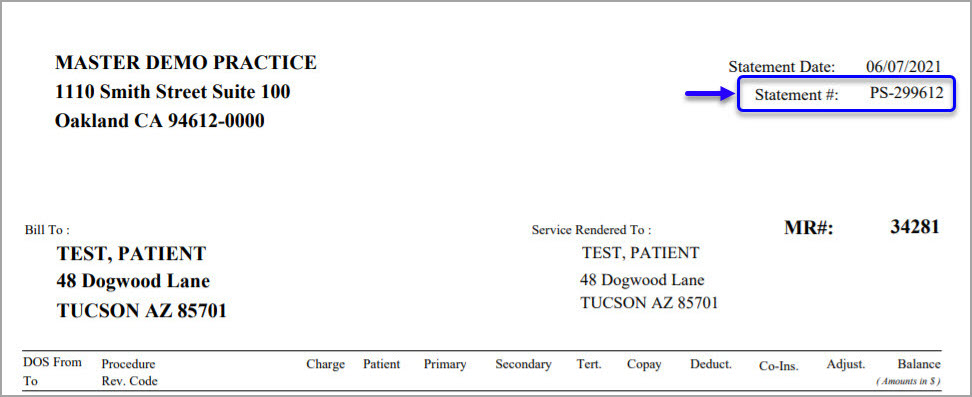
If you have received the bill in the following format, Statement # is located at the top right-hand side below the statement date, and the header is named “Statement #”.
 

Statement Type B (Trizetto)

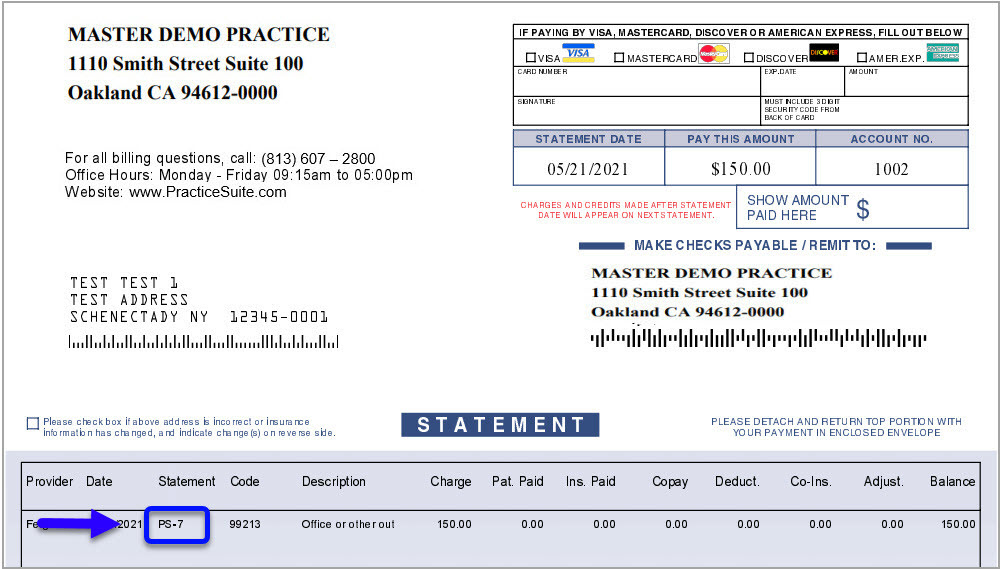
In the below format, Statement # is present inline, where the service info and the payments/balances are displayed. The line header is named “Statement” and is within the main area of the bill.
 

Statement Type C (DMA)

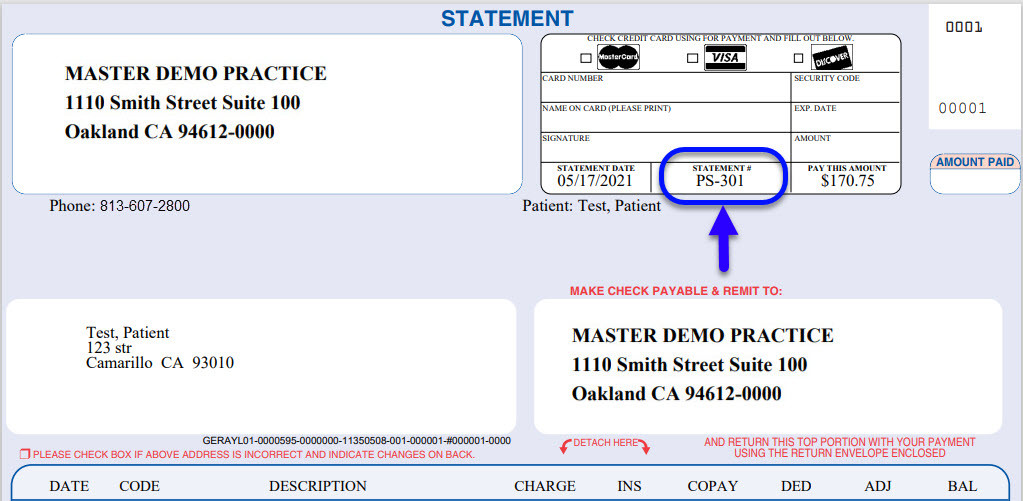
In this bill format, the statement # is presented at the top right-hand side in the header area named “Statement #”.
 

API Menu

  • Patient Search
  • Patient C-CDA
  • Patient CCDS
  • Terms of Service

Related Articles

  • Patient Upload

    Patient Data Upload Practice Management System now facilitates bulk patient record upload into the system from ...read more

  • Insurance

    Insurance Information Beneath the demographic details of the patient, all insurances related to the patient ...read more

  • Other Attributes of a Patient

    The Other Atrributes Page The Other Attributes page of the patient demographics contains miscellaneous information of ...read more

  • Guarantor

    Guarantor The guarantor is the person who is responsible for the medical bill if all other ...read more

  • Patient Inbox

    Description The Inbox tab of the Patient Demographics page facilitates interoffice communication regarding matters related to ...read more

  • Demographic Sheet Report

    About Demographic Sheet Report Demographic Sheet Report displays the demographic information of a patient in a ...read more

PS Academy

Categories

  • Introduction to Practice Management system 5
  • Authorization 3
  • Security 6
  • Scheduler 29
  • Setup & Advanced Setup 40
  • Patient & Patient Account 30
  • Patient Portal 13
  • Charges & Claims 38
  • Referrals 1
  • Payments 22
  • Add-On Services 4
  • Report Central 141
  • Collections 5
  • HIPAA Office 6
  • Inter-Office Messaging 4
  • Time Card 1
  • Product Release 58
  • FAQs 109
  • Miscellaneous 5
  • Training Videos 1

Popular Articles

  • Create Custom Superbills
  • System requirements
  • Initiating Practice Management system
  • ICD-10 Lookup
  • Payment Entry from the Posting screen
  • Charge Entry
  • How To Use ICD-10 From Charge Master Screen?
  • How To Use ICD-10 From Charge Entry Screen?
  • Welcome to our Practice Management system
  • Disabling Pop-up Blocker

Latest Articles

  • I27. Insurance Payments by Case Type
  • I28. Patient Payments by Case Type
  • G7. Claim Status Summary by Payer
  • Protected: Product Release Document v25.12.0
Copyright © 2026 All Rights Reserved.
  • Home
  • Practice Management PRD
  • Interface PRD