Partner Academy

Patient Inbox

/Patient & Patient Account /Patient Inbox

Description

The Inbox tab of the Patient Demographics page facilitates interoffice communication regarding matters related to a patient.

How to Access Patient Inbox

Open the Patient Demographics page of a patient and click on the Inbox tab.
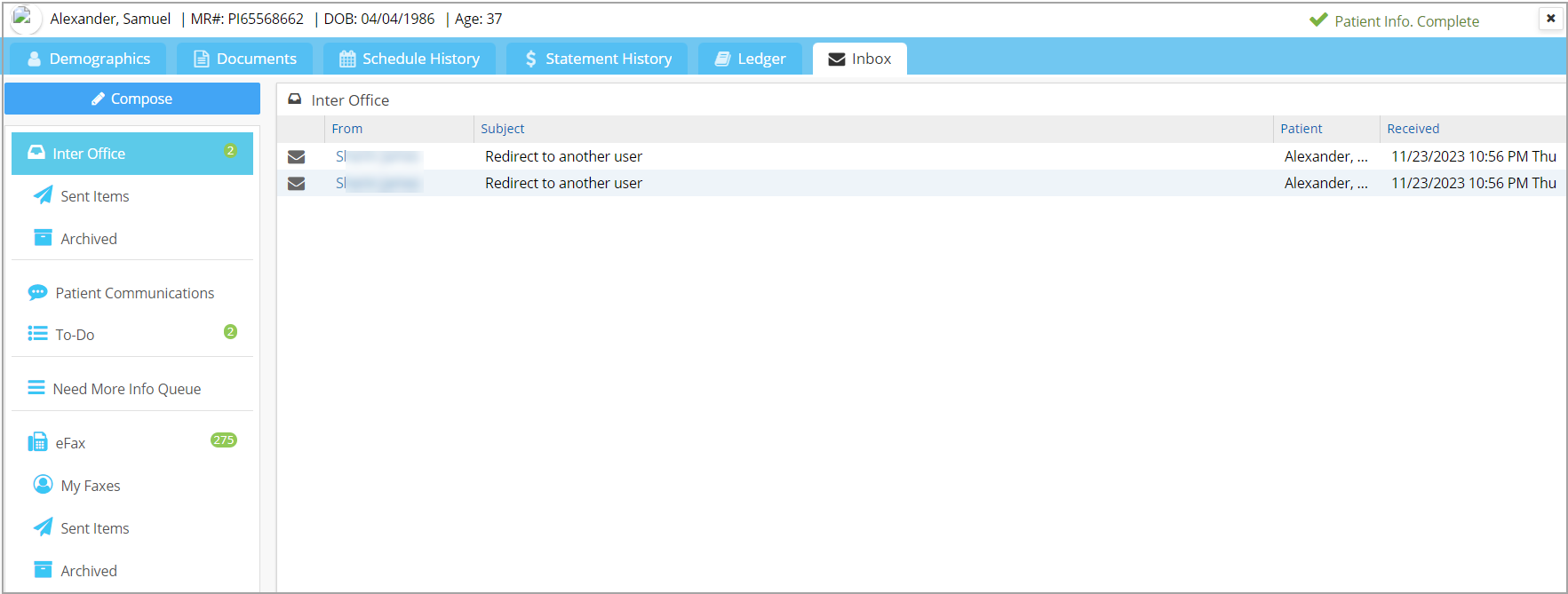
The below-listed sections will open up when the screen is accessed from Patient module.

1.  Inter Office Messages

2. Patient Communications

3. To-Do List

4. Need More Info Queue

5. eFax

Note: When accessed from Demographics/EHR, the above-listed sections (except Need More Info Queue) will display only those messages specific to the patient.

API Menu

  • Patient Search
  • Patient C-CDA
  • Patient CCDS
  • Terms of Service

PS Academy

Popular Articles

  • Create Custom Superbills
  • System requirements
  • Initiating Practice Management system
  • ICD-10 Lookup
  • Payment Entry from the Posting screen
  • Charge Entry
  • How To Use ICD-10 From Charge Master Screen?
  • How To Use ICD-10 From Charge Entry Screen?
  • Welcome to our Practice Management system
  • Payment Master

Latest Articles

  • Setup Secondary ID for Providers
  • Personal Profile Page
  • Portal Access
  • Protected: Product Release Document v25.15.0
Copyright © 2026 All Rights Reserved.