Partner Academy

Portal Access

/Patient & Patient Account /Portal Access

Portal Setup

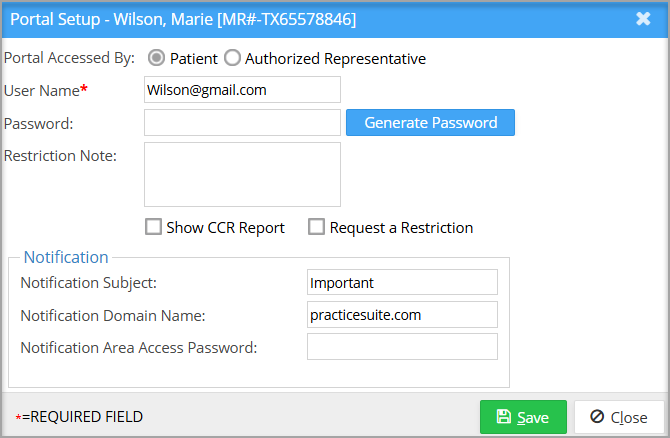
The patient portal Setup page in patient demographics helps set up the patient’s portal credentials, along with CCDA restriction setup and CCR report availability.

Portal Setup Screen

Patient Portal Setup

Field Description
Portal Accessed By Patient/Authorized Representative
Username By default, the patient’s email ID will be populated.
Password Either provide a password or use the generate password option.
Request a Restriction Choose this to restrict CCDA information from displaying on the patient portal.
Restriction Note To add additional context for the restrictions.
Show CCR Report Select this to show CCR report on patient portal


API Menu

  • Patient Search
  • Patient C-CDA
  • Patient CCDS
  • Terms of Service

Related Articles

  • Patient Upload

    Patient Data Upload Practice Management System now facilitates bulk patient record upload into the system from ...read more

  • Insurance

    Insurance Information Beneath the demographic details of the patient, all insurances related to the patient ...read more

  • Locate Statement# for Bill Payment

    Where to Look for Statement#? As bills can be formatted differently based on the type of ...read more

  • Other Attributes of a Patient

    The Other Atrributes Page The Other Attributes page of the patient demographics contains miscellaneous information of ...read more

  • Guarantor

    Guarantor The guarantor is the person who is responsible for the medical bill if all other ...read more

  • Patient Inbox

    Description The Inbox tab of the Patient Demographics page facilitates interoffice communication regarding matters related to ...read more

PS Academy

Categories

  • Introduction to Practice Management system 5
  • Authorization 3
  • Security 6
  • Scheduler 29
  • Setup & Advanced Setup 42
  • Patient & Patient Account 31
  • Patient Portal 14
  • Charges & Claims 39
  • Referrals 1
  • Payments 22
  • Add-On Services 4
  • Report Central 141
  • Collections 5
  • HIPAA Office 6
  • Inter-Office Messaging 4
  • Time Card 1
  • Product Release 60
  • FAQs 109
  • Miscellaneous 5
  • Training Videos 1

Popular Articles

  • Create Custom Superbills
  • System requirements
  • Initiating Practice Management system
  • ICD-10 Lookup
  • Payment Entry from the Posting screen
  • Charge Entry
  • How To Use ICD-10 From Charge Master Screen?
  • How To Use ICD-10 From Charge Entry Screen?
  • Welcome to our Practice Management system
  • Payment Master

Latest Articles

  • Setup Secondary ID for Providers
  • Personal Profile Page
  • Portal Access
  • Protected: Product Release Document v25.15.0
Copyright © 2026 All Rights Reserved.
  • Home
  • Practice Management PRD
  • Interface PRD