Provider Secondary ID
Secondary IDs are insurance-specific. Some payers require the secondary ID of providers in addition to their NPIs to be sent on claims.
Setup Secondary ID
The provider’s secondary ID is set up from the Provider Setup screen.
Go to Setup from the main menu and choose Provider. Select the required provider and click  .
.
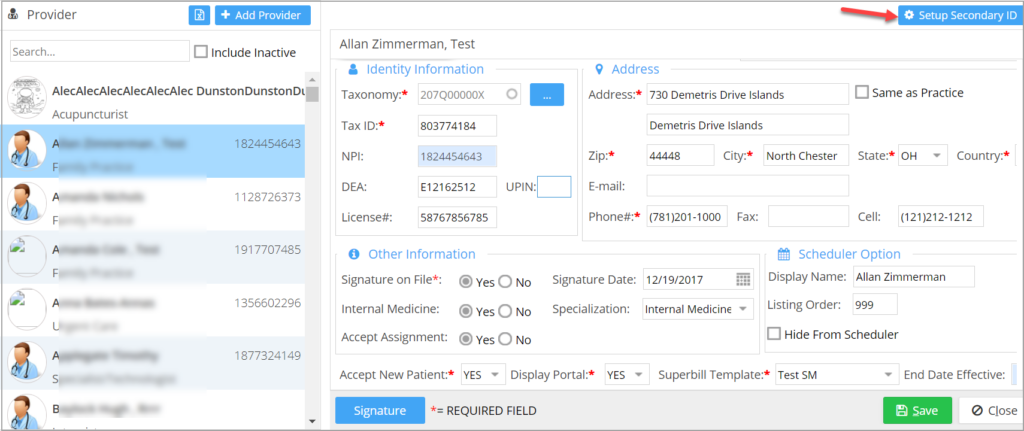
The Setup Secondary ID screen will open, displaying any previously added secondary IDs. If none have been added, the list will appear empty.
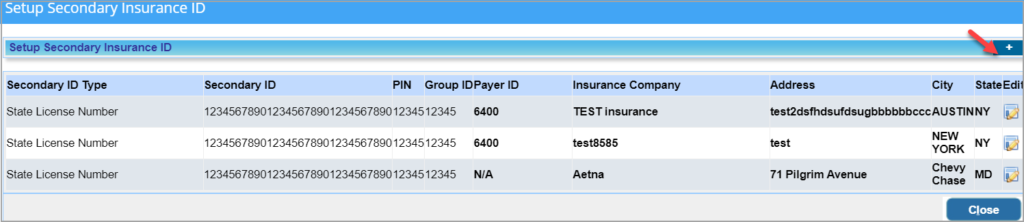
Click the Add button  to add a secondary ID.
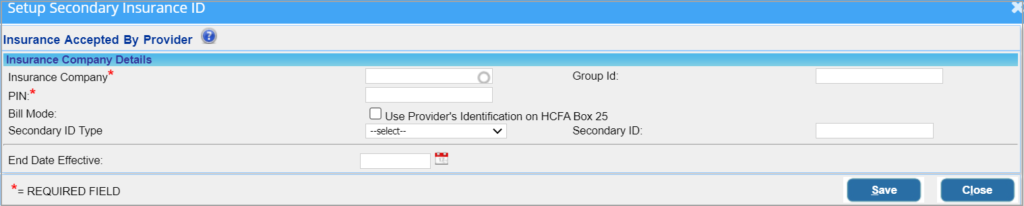
When the Insurance Accepted by Provider screen appears, select the Insurance Company.
Enter the PIN, and the Group ID number of the provider in the relevant boxes.
Select the Secondary ID Type and provide the corresponding Secondary ID.
Click Save after entering all the required details.
2. When a Group ID is entered in the provider’s Setup Secondary ID screen (Provider Master), the Group ID will populate in the payer loop (2010BB) and the provider’s Secondary ID will populate in the rendering provider loop (2310B). If no Group ID is present, the provider’s Secondary ID will continue to populate in both the payer and rendering provider loops, as previously.