Practice Management System
Release Note
Product Release Version: v20.3.6
Product Release Date: Aug 2022
© 2022 Practice Management System
Disclaimer: All rights are reserved. No part of this work may be reproduced in any form or by any means through graphic, electronic, or mechanical, including photocopy, recording, or information storage and retrieval systems – without written permission of the publisher.
The products that are referred to in this document may be either trademarks and/or registered trademarks of the respective owners. The publisher and the author make no claim to these trademarks.
While every precaution has been taken in the preparation of this document, the publisher and the author assume no responsibility for errors or omissions, or for damages resulting from the use of information contained in this document or from the use of programs and source code that may accompany it. In no event shall the publisher and the author be liable for any loss of profit or any other commercial damage caused or alleged to have been caused directly or indirectly by this document.
Printed Aug 2022 at PracticeSuite, Inc.3206 Cove Bend Dr Suite A Tampa FL 33613
Part – 1 Enhancements
1.1 ‘Refund’ Type Payment Entries
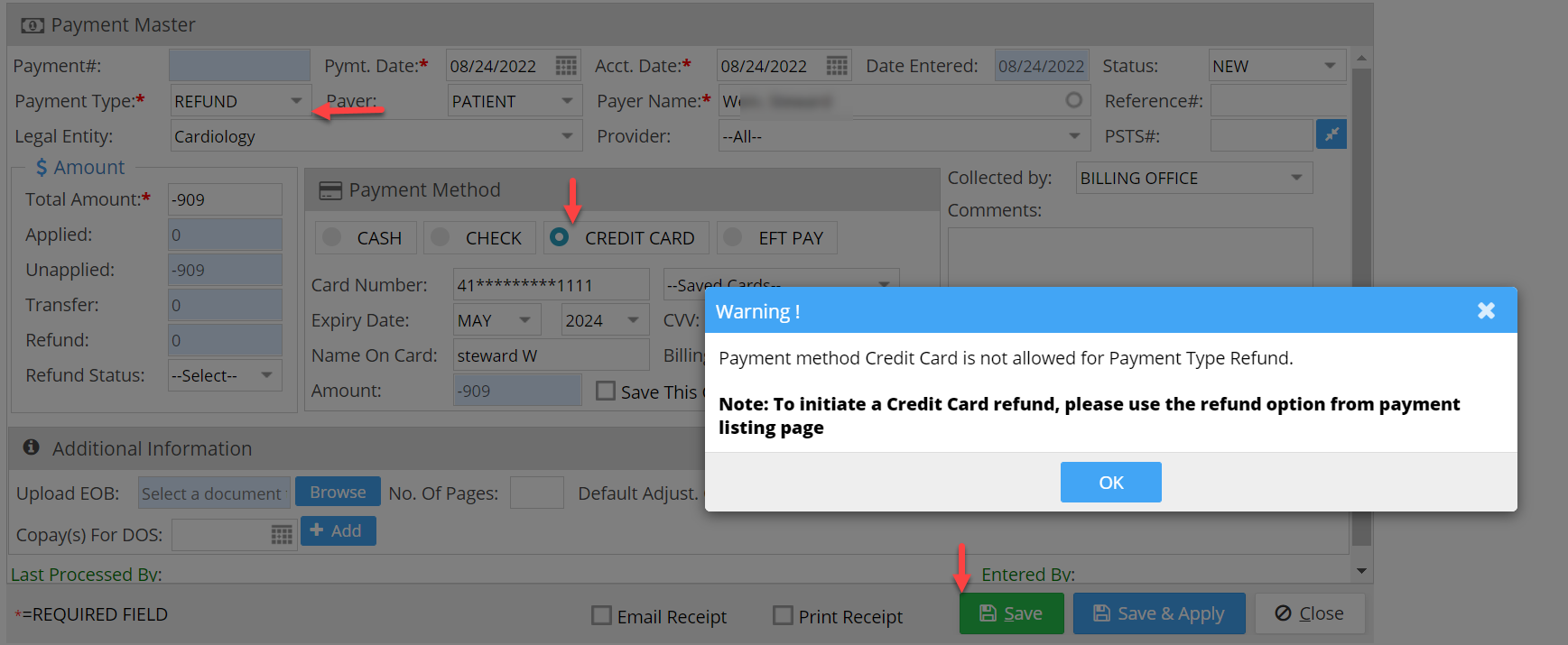
For the accounts that have payment gateway enabled, users can no longer add a refund type entry if the “Pay Method” selected is “Credit Card”. A warning message will be flashed on the screen if the user tries to add the entry with the type refund (refer to Image 1.1).
1.2 WorkQueue- Set Ranking Thresholds
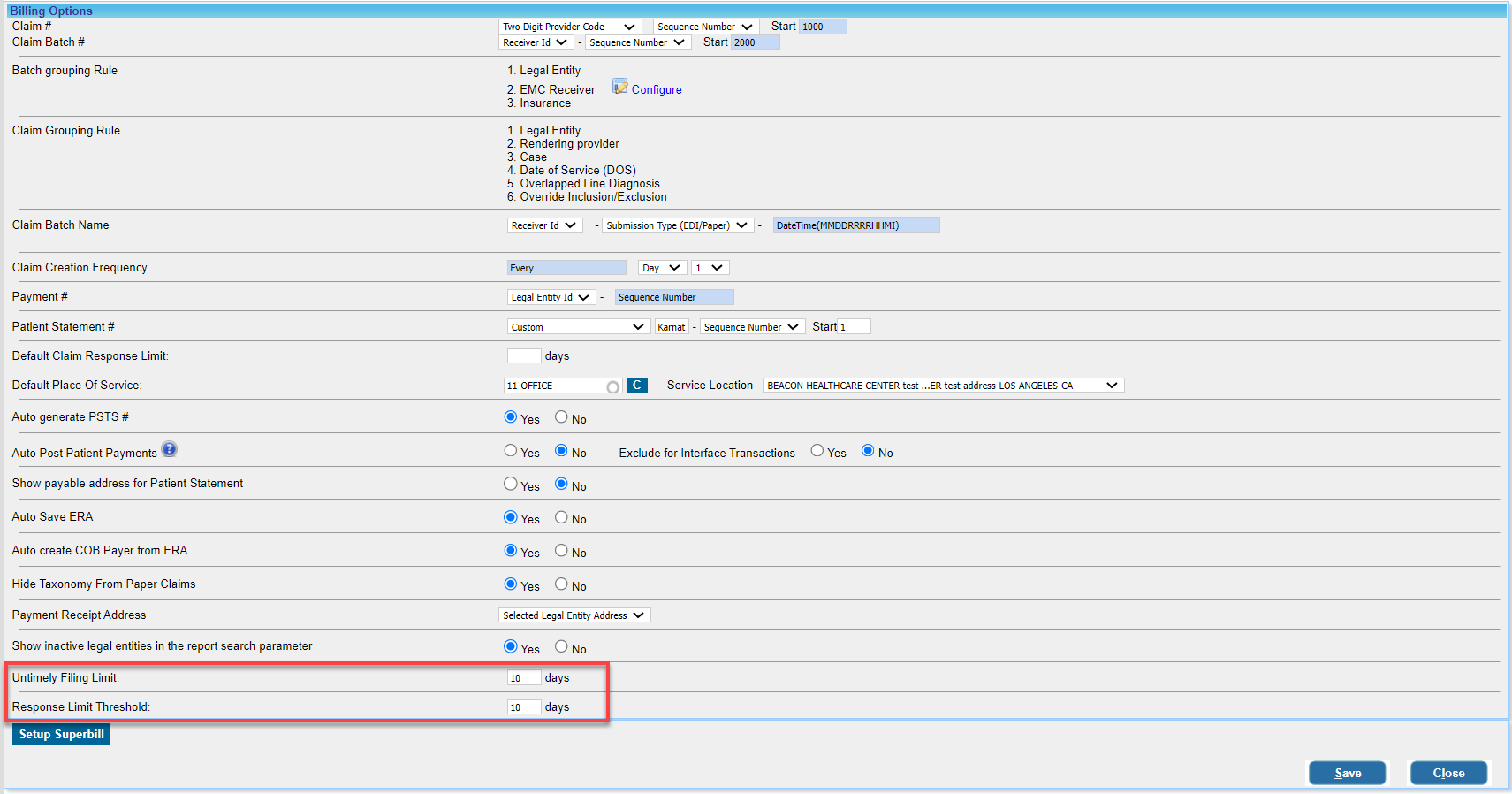
Users can now set default threshold days for the “Untimely Filing Limit” and “Response Limit Threshold” parameters of the Ranking Workqueue from the “Billing Options” screen (see highlighted fields in Image 1.2).
1.3 SSO-User Addition and Edit Restricted to Admins
Single-sign-on user additions and edit privileges are hereafter restricted to the “Administrator” type users.
1.4 Patient Portal- Patient Kiosk/Consent Forms
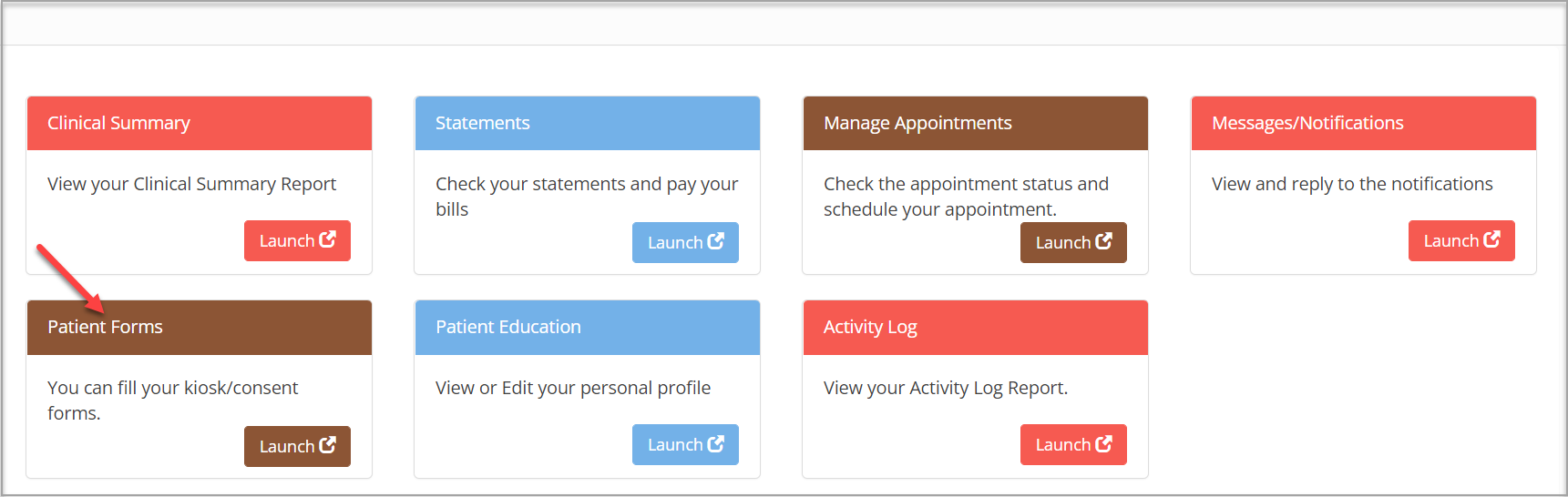
Renamed “Patient Kiosk/Consent Forms” to “Patient Forms” (Image 1.4).
1.5 Provider Setup- New Columns in the Excel Export
The Provider list export in excel (from the Provider Setup screen) has new fields added in the output file. Additionally, the “Provider Name column has been split into three separate columns for “First Name”, “Last Name”, and “Middle Initial”; please see Image 1.5a.

The new fields added to the report are – Start Date Effective, End Date Effective, Created By, Creation Date, Modified By, and Modification Date. Please refer to Image 1.5b.

Part – 2 Reports
2.1 G5. Collector Worklist Report – Provider Taxonomy Code
Provider Taxonomy Code is added to the CSV output of the G5 report.
2.2 C2. Generate Patient Statement- Change in the Filter
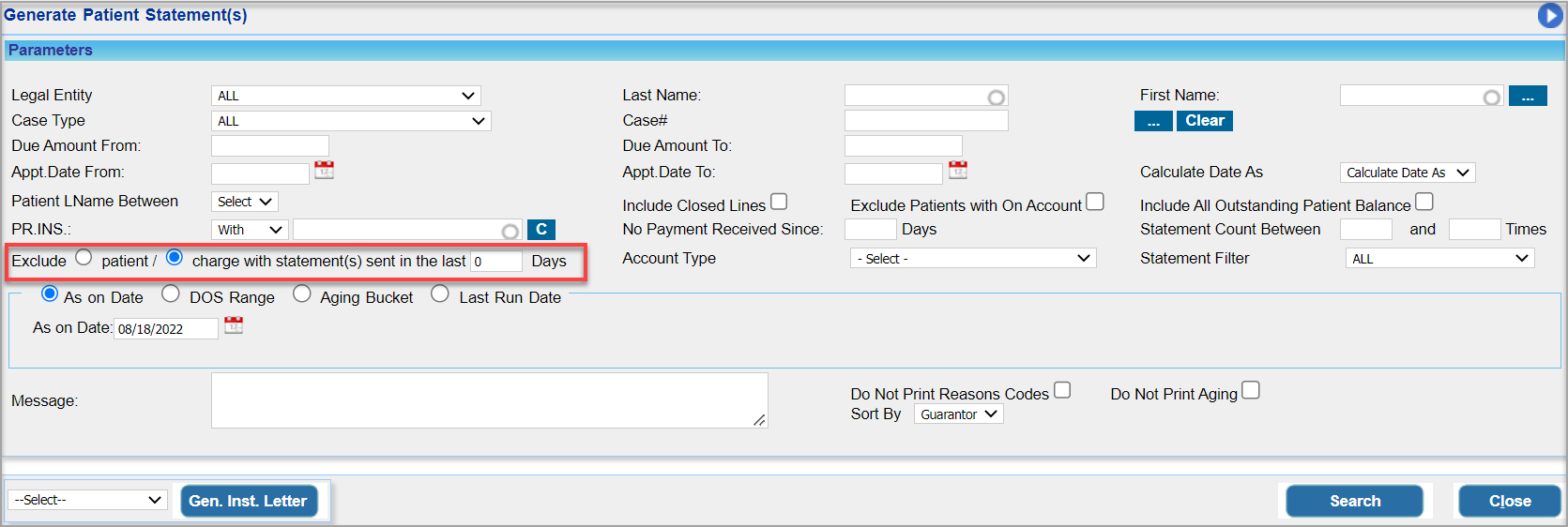
The filter named ‘Exclude charges with Statement(s) Sent in the Last N days‘ (highlighted in Image 2.2) can hereafter accept “0” days as the input for the statement generation. An explanation for the input days is given below:
* 0 – excludes statements generated on the current day.
* 1 – excludes statements generated on current minus 1 day.
* n – excludes statements generated current minus n days.
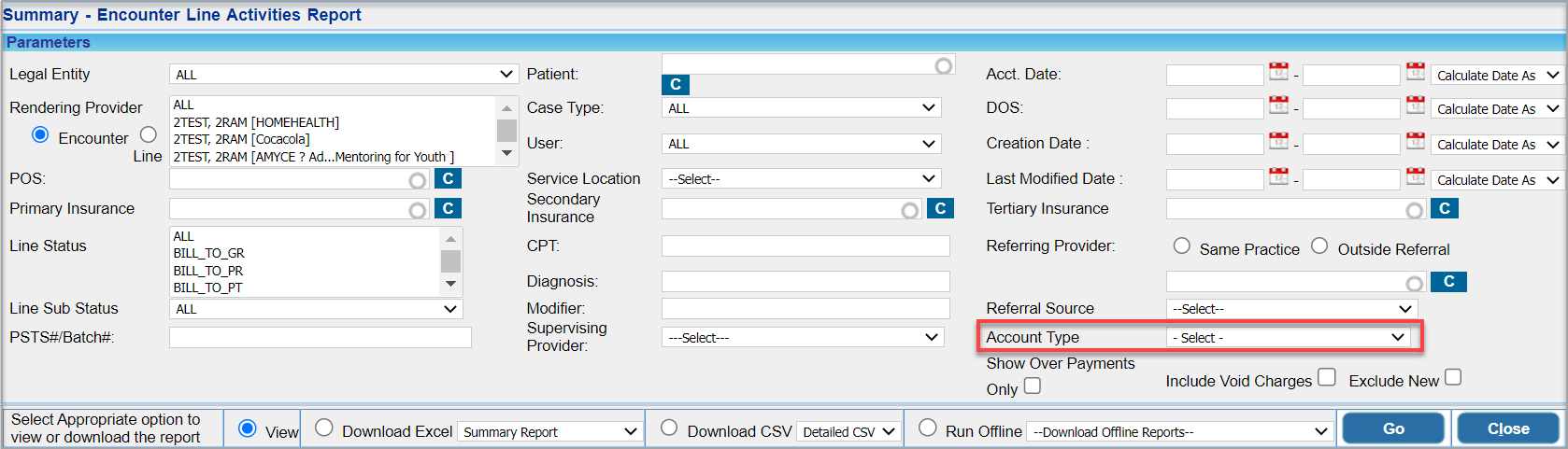
2.3 ‘I8. Summary -Encounter Line Activities Report’
2.3.1 ‘Account Type’ Filter
The patient account type dropdown filter is added to the I8 report. Please see highlighted in Image 2.3.1.
2.3.2 Payer Address Info Added in Detailed CSV
Primary, Secondary, and Tertiary insurance addresses have been added to the detailed CSV output of the I8 report; Image 2.3.2 is a section of the detailed CSV showing the newly added fields.

2.4 ‘E2 Report’-Insurance Policy End Date Added in the Excel output
In the report, ‘E2. Patients By Insurance Co. Report’, the policy end date has been added to the excel output. Previously, this information was merely shown on the screen and was not available as a field in the exported file.
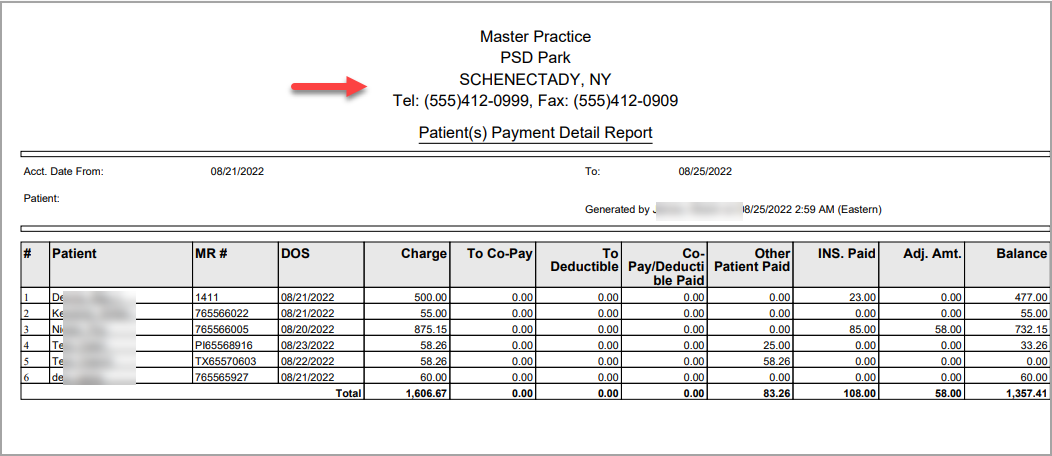
2.5 Practice Info On ‘I13. Patient(s) Payment Detail Report’
The practice headers that include the name, address, telephone, and fax number will now be displayed in the PDF output of the I13 report; please see Image 2.5.
Part – 3 Bug Fixes
3.1 Collection Manager Performance
A significant fine-tuning of the Collection Manager app was completed to improve its performance.
3.2 e-Rx Refill Issue for Mid-level Providers
An e-Rx refill issue for mid-level providers has now been addressed.
3.3 QRDA File to Populate Patient Data
QRDA 1 file on Clinical Quality Measures will hereafter include patient data.
3.4 I16 Report -Allowed Amount
In I16. Insurance Reimbursement Variance Report, the allowed amount for denied claims used to be shown in the report. The denied claims have been excluded from the report.
3.5 Payments- Amount Issue for Fully Applied Payments
When the user closes out of the payment screen of a fully applied payment, the applied amount in the field changes to “0”. This issue has been addressed.
3.6 Payments – Refund Option
The ability to add refund type of payment entries has been reinstated for the non-payment gateway accounts. It was unavailable until the current release.
3.7 Inactive Patients Insurances in C6 Report
Inactive patient insurances were erroneously shown as active in C6. Patient Details Report. This is now resolved.
3.8 Eligibility Check from A10 Report
The manual eligibility check was unavailable from the A10 report. This issue has been addressed.
3.9 Online Appointments
Practices that permitted patients to book appointments online without requiring the Practice’s approval (these are Practices that had the online portal booking option selected as “Yes” for “Allow Online Appointment Without Consultation from Practice”), these appointments were not showing in some of the appointment reports. This issue has been corrected.
3.10 Blank Screen on Scheduler History Tab
The Schedule History tab in the patient demographics screen displayed a blank page if the request reason (free text field) for any of the listed appointments had a special character. This issue is now resolved.
3.11 ERA – Sorting by Check Date
Sorting by check date wasn’t previously functional on the ERA listing page This issue is resolved.
3.12 Patient Listing in D4 Report
Patients without either insurance or patient balance were shown in the ‘D4. Summary-Insurance Balance and Aging By Patient Report’ with a “0” balance. An update has been made to the report to exclude patients without an outstanding balance.
3.13 H5 Report Populating Issue
Users were unable to generate ‘H5. Productivity 360°’. This is resolved.
3.14 Voided Appointments in B6 Report
‘B6. Appointments-Charges Reconciliation Report’ erroneously listed voided appointments. This is now resolved and voided appointments are now excluded from the report.