Practice Management System
Release Note
Product Release Version: 19.9.0
Product Release Date: Oct 2021
© 2021 Practice Management System
Disclaimer: All rights are reserved. No part of this work may be reproduced in any form or by any means through graphic, electronic, or mechanical, including photocopy, recording, or information storage and retrieval systems – without written permission of the publisher.
The products that are referred to in this document may be either trademarks and/or registered trademarks of the respective owners. The publisher and the author make no claim to these trademarks.
While every precaution has been taken in the preparation of this document, the publisher and the author assume no responsibility for errors or omissions, or for damages resulting from the use of information contained in this document or from the use of programs and source code that may accompany it. In no event shall the publisher and the author be liable for any loss of profit or any other commercial damage caused or alleged to have been caused directly or indirectly by this document.
Printed October 2021 at PracticeSuite, Inc.3206 Cove Bend Dr Suite A Tampa FL 33613
Part – 1 Enhancements
1.1 Export Option in Masters
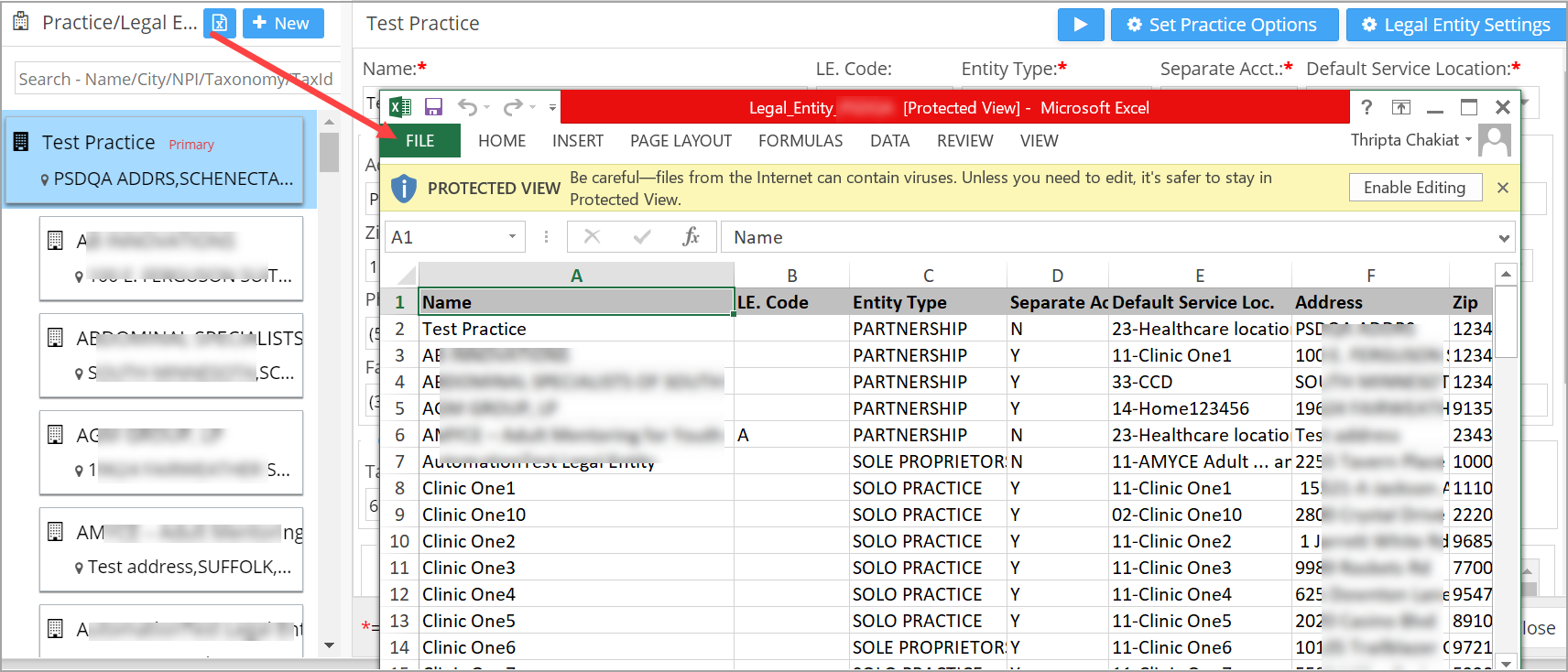
All Master screens – Legal Entity, Service Location, Provider, Referring Provider, and Insurance will have an option to export to excel. Image 1.1 is a sample export of Legal Entity list.
1.2 2022 ICD 10 Codes
Practice Management System ICD-10 repository is updated with the codes in effect from October 1, 2021.
1.3 Notification
1.3.1 Default Email Configuration
For email reminders and eStatements, the configurations page has a new option to choose a default “From (E-Mail)” to send to recipients. If the option “Default” is chosen in the settings page, “From Email ID”, “Auth. mail”, “Auth. Password” and “Mail Host” fields become non-editable, as the <doNotReply@practicesuite.com> email is used. Likewise, for the eStatements the system will use- <donotreply@portalservice.practicesuite.us>.
A. For the appointment reminders, from email will use the format ‘Practice-Name <doNotReply@practicesuite.com>’.
B. For eStatements, from email format will be the Practice-Name <donotreply@portalservice.practicesuite.us>.
C. The following fields shown in the image will be disabled in the default mode (see Image 1.3.1a). Users can also choose the custom configuration mode, to use their own email credentials.

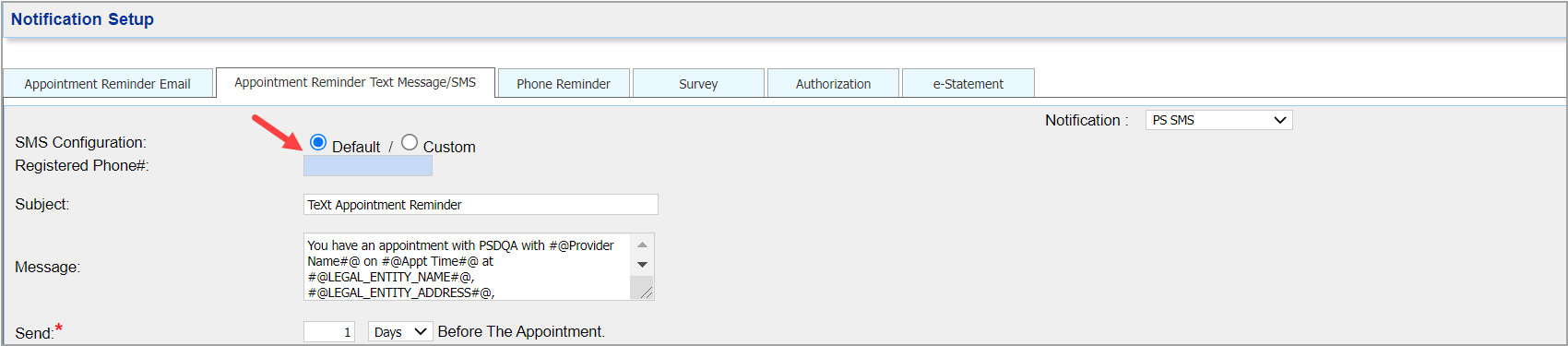
For PS-SMS setup, selecting “Default” option will disable the Registered Phone# field (Image 1.3.1b). Custom mode will allow the practice to configure the field using the number purchased from Telnyx.
Note: Practices should provide ‘Communication preferences’ of each patient to send the email and SMS reminders.
1.3.2 Appointment Reminders to Provide Provision to Confirm or Cancel Appt
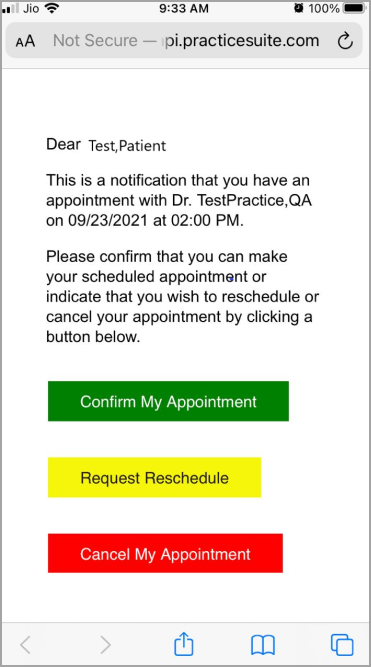
SMS/Email reminders sent to patients will have options for recipients to confirm, cancel or reschedule the appointment. Clicking on the link in the email will direct the user to a screen as shown in Image 1.3.2. User can click on the required option from the screen.
1.4 Patient Statements
1.4.1 A Summary CSV Added with Encounter Level Info
In the patient statement generation screen, apart from the existing statement generation methods, a new action  added which would generate CSV file containing encounter level information only. This file would thus exclude procedure code, procedure description, and payer remarks.

1.4.2 Statements sent to Clearinghouse to Have Billable Code
Statements sent to Clearinghouse will now contain billable code instead of code modifiers.
1.5 XSuperbill
1.5.1 Bulk Status Removal For Patients in Pre-collection and In-collection
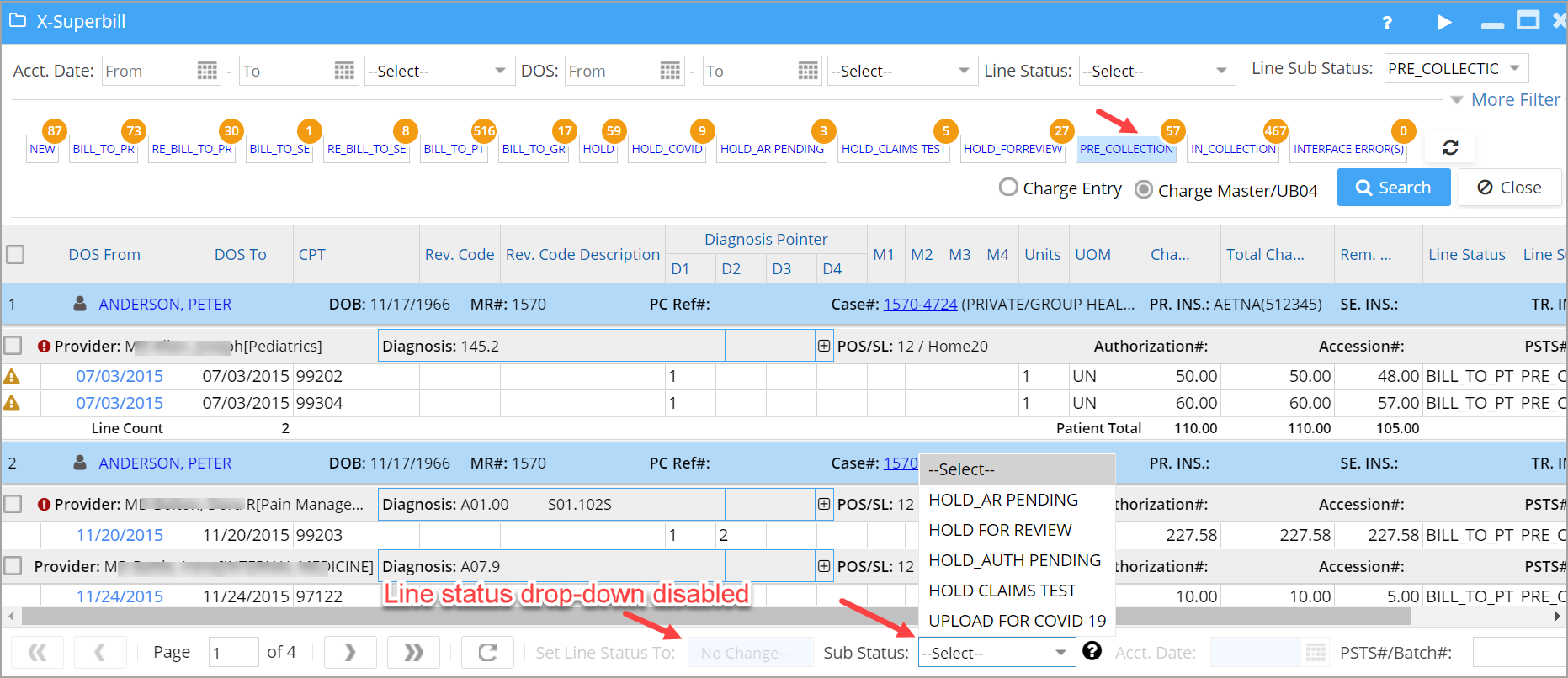
Two Buckets created in X-Superbill screen; Pre-Collection bucket to list patients in Pre-collection sub status and In-Collection bucket to list patients in Collection status. Click on the respective bucket and do the following.
1. For bulk Removal of In-Collections status, user can change the status of the lines to either Bill_To_PT or Bill_To_GR; Select an appropriate one from the Line status drop-down at the bottom.
2. For bulk removal of pre-Collection sub status, line status cannot be changed but sub status can be changed to HOLD_type displayed in the sub-status drop-down. Image 1.5.1 shows Pre-collection bucket, and sub status options to change.
1.6 Charge Master- Line Sub Status Changes Will Be Recorded
Any change made to line sub status will be recorded as an encounter activity in Charge Master.

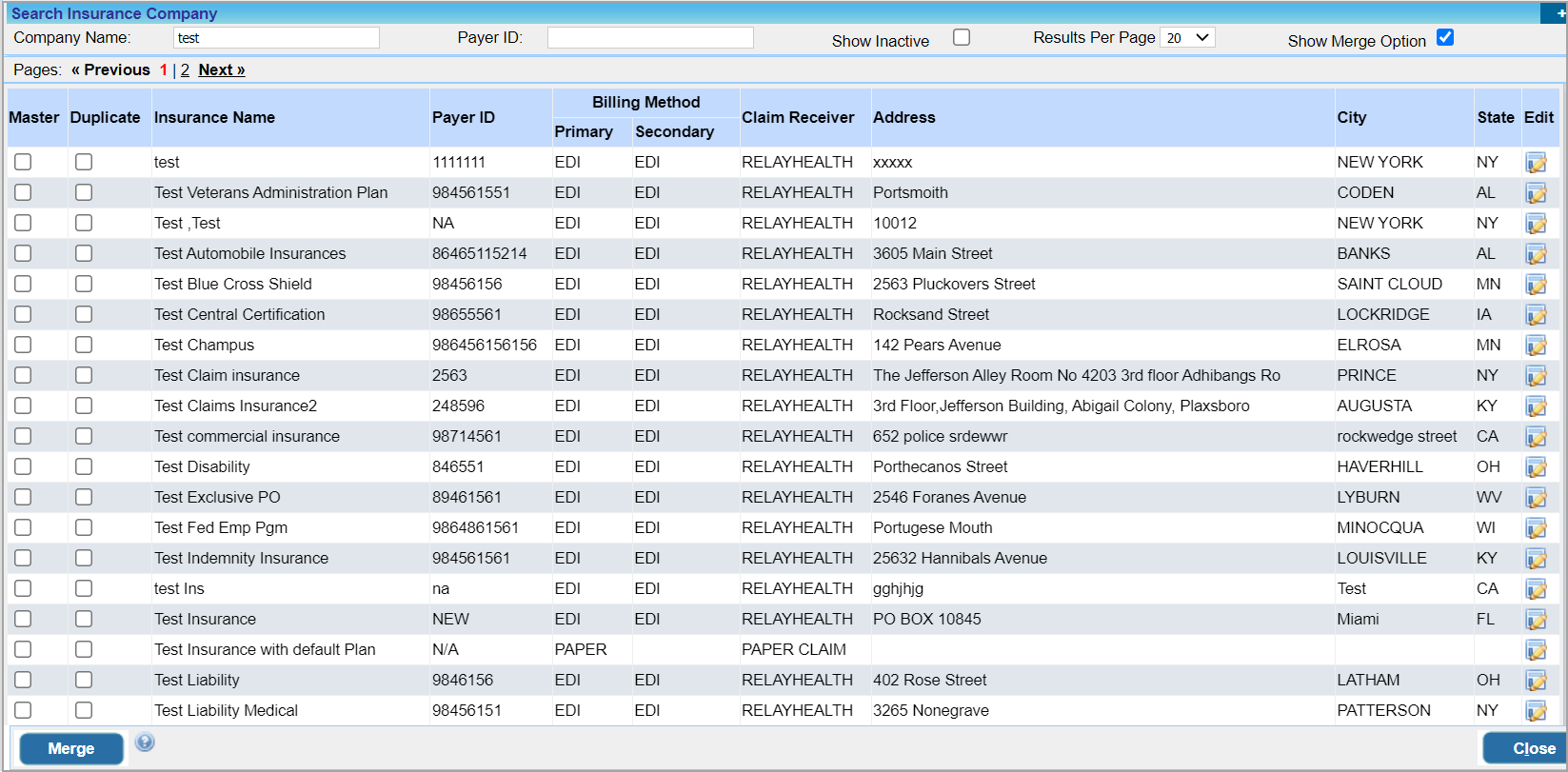
1.7 Insurance merge Feature Introduced
Insurances with identical info can now be merged into one. Insurance master now has a merge icon  to achieve this. Image 1.7 shows the insurance merge screen.
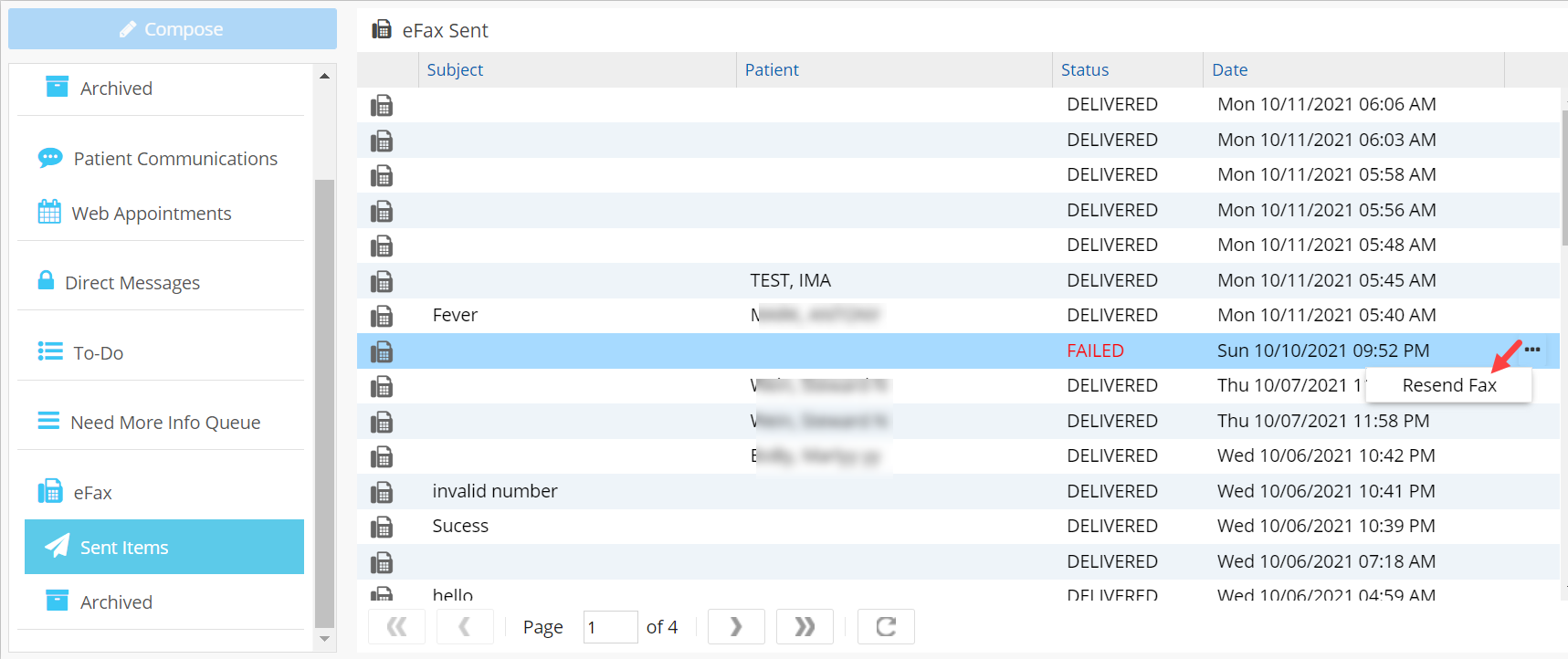
1.8 eFax- Provision to Resend Failed Messages
Practice Management System now facilitates Resending failed eFax messages.
1.9 Audit Enabled for Service Location and Insurance Company Master
Insertions and updating of master records of service location and insurance company are now available for audit and can be viewed in the Audit Report. Image 1.9 shows the audit report displaying and update in the address field of Insurance company.

1.10 Eligibility
1.10.1 Eligibility Authorization Info to Include Additional Payer
Practice Management System will store additional payer info received from the clearinghouse. The A10. Eligibility Status Report will have additional columns to display the additional payer and payer address.

1.10.2 From and To Dates Defaulted to the Current Date
‘From’ and ‘To’ Dates in the Eligibility Screen of patient demographics will be defaulted to the current date. This would yield accurate coverage details from clearinghouse.
1.11 Kiosk- Forms Accessible from Practice Management System
Patient-filled kiosk forms can now be accessed from within Practice Management System under Document manager section; SIGNED_FORMS under Doc manager will display the forms filled from Kiosk.
1.12 Mass Posting -Two Additional Search Filters Added
New Filters to search using PSTS# and Accession# added to Mass posting screen.

1.13 Credit card Refund
Practices will now have the option to record refund of Credit card transactions without actually refunding the amount. While doing refunds of credit card payments, select payment method other than credit card and a warning message will popup saying that “You are about to refund a payment made through Credit Card. This action will not process the refund from Credit Card as the payment method change to cash/ check/EFT. Are you sure you want to continue?”. Click on Yes to record refund in the system without refunding the amount.
1.14 New Claim Validation Rule Added
a. The coverage level of insurance in the case and in the patient demographics should be the same. An alert will be displayed in case of a mismatch and the user will be prompted to update the case.
b. NDC Code will not allow any special characters and is a 11-digit code.
c. Future dates should not be provided in the DOS field.
d. For Medicare Primary claims, Resubmission code should be “Original claim”.
1.15 Scheduler- Size limit of Notes Field Increased
It is now possible to enter up to 2000 characters from the Notes field in the Scheduler.
1.16 Encounter Procedure Setup -Procedure Code Saved in Uppercase
Procedure codes entered into the system will be saved in Uppercase; this maintains consistency and avoids code mismatch during charge message transfers over interface.
1.17 UB04- SRC Field Will be Defaulted from Case
Box# 15 SRC field in the UB04 screen will be defaulted from the case info.
1.18 Payment –Screen Accessed from CE, CM and Patient Accounts Switched to New UI
Payment screen when accessed from Charge entry, Charge Master and Patient Account will now open up in New UI.
1.19 ERA Screen- Special Character in Payer Name Handled
Presence of special characters in payer name will not prohibit the ERA screen from posting claims.
1.20 Patient portal- Help Icon Added
A help icon added to patient portal which takes the patients to a help page on patient portal pages.
Part – 2 Reports
2.1 ‘A10. Eligibility Status Report’
Users can now view individual eligibility checks done in the system through the A10 report. Earlier only batch eligibility checks were displayed in this report. A10. Search filter section now has a combo box having two options: Appt. Date and Eligibility check date. Filtering via eligibility check date displays all eligibility checks performed both Individually and Batch-wise within this period. Choosing Appt. Date from the combo will display details of batch eligibility checks performed against appointments.

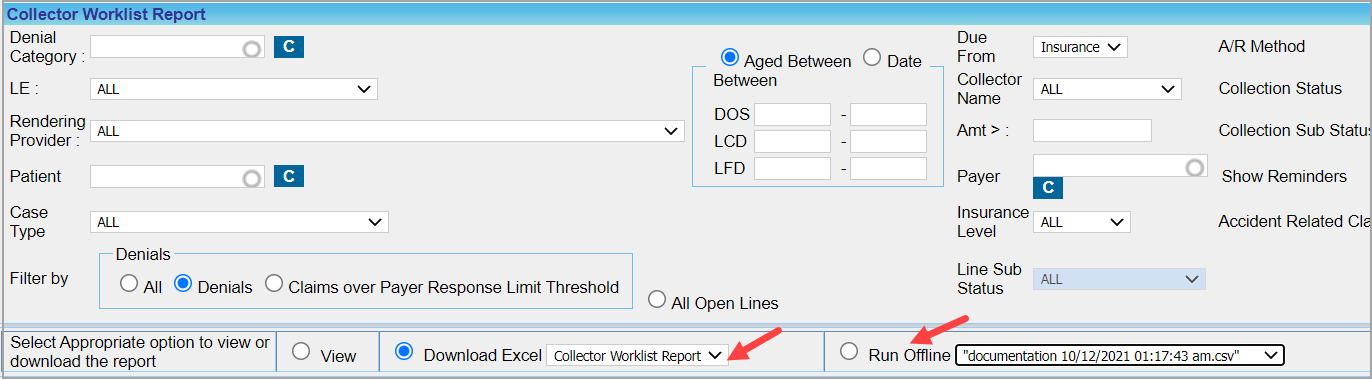
2.2 ‘G5. Collector Worklist Report’
G5 report now can be exported to an excel worksheet; data shown is the same as in the collection manager excel file. Also, G5 now has the offline reporting feature; see Image 2.2.
2.3 ‘B6. Appointments -Charges Reconciliation Report’
Detailed Excel sheet of B6 report will now list procedure codes for NEW charges as well.
2.4 ‘C8. Installment Detailed Report’
Out of the six Installment Statuses, three which are NEW, ACTIVE and PERIOD_COMPLETE added to installment status search filter drop-down of the C8 report.
2.5 ‘C10. Generate Patients in Collections List’
Some fields added to the CSV file. The additional fields are Patient Phone, Patient DOB, Patient SSN, Patient Employer, Patient Emp Phone, Primary Insurance Name, Primary Insurance Policy, Primary Insurance Adj, Secondary Insurance Name, Secondary Insurance Policy, Secondary Insurance Adj, Guarantor Phone, Guarantor DOB, and Guarantor SSN
2.6 ‘I8. Summary Encounter Line Activities Report’
The excel output of I8 report named ‘Accounting period Activities’ will now have an entry in the closed period for any change done to the encounter lines of closed period so that it tallies with J9 and J23 reports.
2.7 ‘D1. Summary Insurance Aging Report’
Query tuning done to the D1 Report and the report will not have time-out issue.
Part – 3 Bug Fixes
3.1 Time Card Report now Shows Time Out Accurately
Time out of users recorded in the time card of Practice Management System was being recorded incorrectly. This is now fixed and user time out is displayed accurately.
3.2 XSuperbill – Claims With Warnings Can Be Processed
Claims that trigger claim validation errors like warnings, messages and alerts can now be checked for processing.
3.3 Rebill option in the old UI Case-switch Screen Enabled
Old UI of Case-Switch screen had the ‘Rebill’ option always disabled which is now corrected.
3.4 It is now Possible to download Patient Statement PDF from Patient Portal
Users were unable to download patient statement PDF from the portal. It is now fixed.
3.5 Discrepancy Regarding Charge Amount In Case Switching Resolved
In case of procedure codes having different amounts in different date ranges in the Fee Schedule, charge amount was being taken depending on the switched date. This is now resolved and the amount will be fetched from fee schedule depending on the DOS.
3.6 CSV Output of C3. Patient Statement Summary Report now Shows all Records
CSV output of C3 report for statement Type ‘Collections’ were displaying lesser records than the actual count. This is now fixed.
3.7 Bug Involving EOB In Payment Transfers Corrected
While doing payment transfer from one payment to another, the EOB was also getting replaced. This is now resolved and the EOB remains unchanged in both payments.
3.8 G1. Claim Detail Report Count Corrected
Claims submitted as COB when closed will not appear in G1 report.
3.9 Inter Office messages
3.9.1 Contents of Archived Messages Now Visible
Users were unable to view the contents of messages in the archive folder. This is corrected and the archived message contents are now visible.
3.9.2 Character Limit of the Subject line Increased
We have increased the maximum character limit of the subject line of messages to 150 and thus errors in sending message with a lengthy subject line is resolved.
3.10 Scheduler- Bug Regarding Patient Notes Field Corrected
Insurance information was not displayed and some links from the scheduler were not working when the Patient notes entered was more than 2000 characters. This is now fixed.
3.11 ERA Listing Page Will now Display all the Claims
When Claim count was more than 500, some claims were missed out while listing. This is now resolved and all claims in very large ERAs will now be listed in the ERA listing page.
3.12 Payment – Sort Function of Payment Date Column Corrected
While trying to sort the payment list according to Payment Date in the Payment search page, did not arrange the payments date-wise. This is now corrected.
3.13 Unwanted Text Removed from Prescription eFAx
Inappropriate text appearing at the end of all Prescription eFax messages removed.