Description
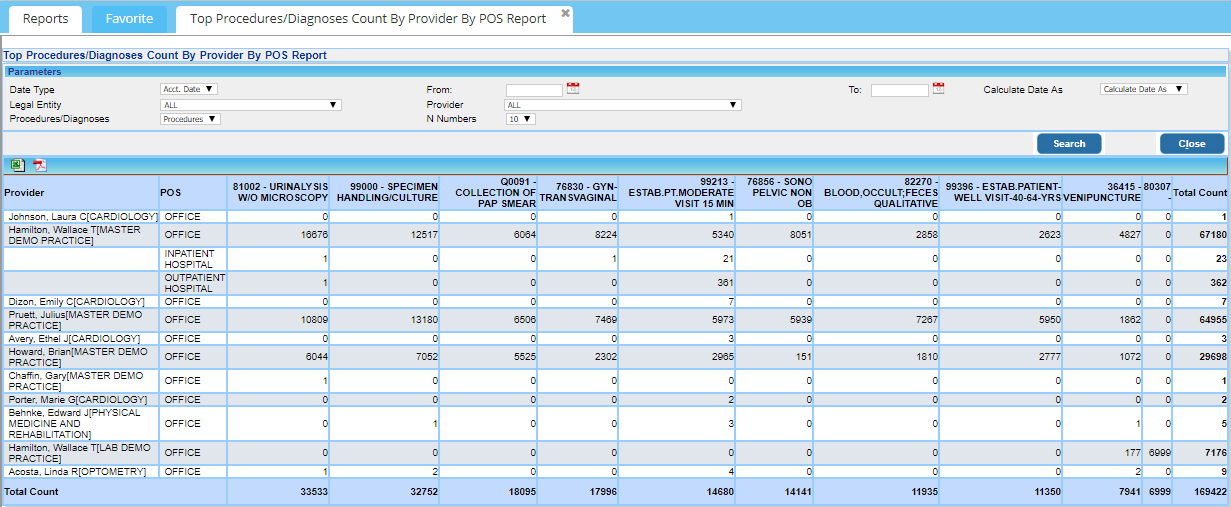
The report captures the top-billed procedures and diagnoses with a dropdown for users to choose from the top 10, 20, or 30. Procedure details include the procedure code, description, and count.
Search Filters for J18 Report
| Field | Description |
| Date Type | Choose accounting date or DOS and then provide the date range |
| Legal Entity | To show results for a specific legal entity |
| Provider | To show results for a specific provider |
| Procedures/Diagnoses | To display the report procedure-wise, select procedures or choose diagnoses to get details according to diagnoses. |
| N Numbers | The drop-down has values 10, 20, and 30. Select 10 to display the top 10 procedures/diagnoses; 20 to view top 20 procedures/diagnoses, etc. |
Search Screen of J18 Report

Sample J18 Report
Possible Outputs of J18 Report
| Output | Download and View Sample |
| Excel |  |
 |