Image 1 provides a visual example of the appointment view as seen in the Charge Entry screen.
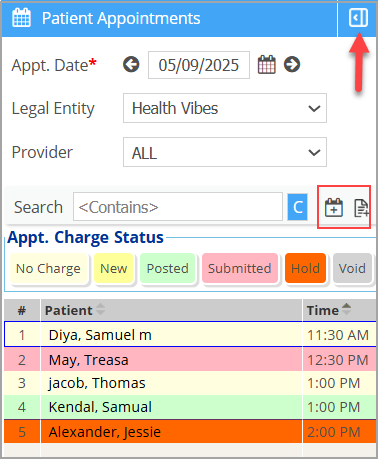
Color categorization helps easily identify the charge status and locate an unposted charge. Table 1 gives a brief description of each color code.
| Color | Description |
 |
Indicates that no charge has yet been created against the appointment. |
 |
Charges that are partially complete, slated to be completed on a later date. Charges from EHR appear with New status. Only charges in the NEW state can be edited from Charge entry. |
 |
The charge which has been saved as ‘BILL_TO_PR’,’BILL_TO_PT’, or ‘BILL_TO_GR’ |
 |
The charge that has been submitted for the claims |
 |
Indicates the charge has been saved as ‘HOLD’ |
 |
Indicates the charge has been saved as ‘VOID’. |
Table 1